
# 第一个react项目结构目录
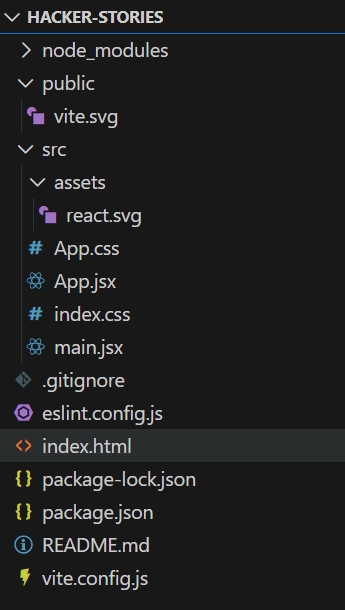
# package.json
这个文件会显示所有第三方依赖(也就是位于 node_modules/文件夹中的节点包)以及与 Node/npm 相关的其他重要项目配置列表。
DETAILS
This file shows you a list of all third-party dependencies (read: node packages which are located in the node_modules/ folder) and other essential project configurations related to Node/npm.
# package-lock.json
该文件指示 npm 如何拆解(即解析)所有节点包版本及其内部第三方依赖。我们不会碰这个档案。
# node_modules/
这个文件夹包含所有已安装的节点包。由于我们用 Vite 创建了 React 应用,已经安装了各种节点模块(例如 React)。我们不会碰这个文件夹。
# .gitignore
这个文件表示所有在使用 git 时不应该添加到 git 仓库的文件夹和文件,因为这些文件和文件夹应该只在你的本地机器上。node_modules/文件夹就是一个例子。只需与团队中的其他开发人员共享 package.json 和 packagelock.json 文件,这样他们就能用 npm 安装依赖,而无需与所有人共享整个node_modules/文件夹。
# vite.config.js
一个用于配置 Vite 的文件。打开它时,你应该会看到 Vite 的 React 插件。如果你用另一个 Web 框架运行 Vite,另一个框架的 Vite 插件会显示出来。最终,这里还有许多可选设置。
DETAILS
A file to configure Vite. If you open it, you should see Vite’s React plugin showing up there. If you would be running Vite with another web framework, the other framework’s Vite plugin would show up. In the end, there are many more things that can optionally be set up here.
# public/
该文件夹存放项目的静态资产,如 favicon,用于浏览器标签页的缩略图,用于启动开发服务器或构建项目生产环境。
DETAILS
This folder holds static assets for the project like a favicon which is used for the browser tab’s thumbnail when starting the development server or building the project for production.
# index.html
启动项目时浏览器中显示的HTML。不过如果你打开它,应该不会看到太多内容。不过,你应该会看到一个脚本标签,它链接到所有 React 代码所在的源文件夹,以便在浏览器中输出 HTML/CSS。
DETAILS
The HTML that is displayed in the browser when starting the project. If you open it, you shouldn’t see much content though. However, you should see a script tag which links to your source folder where all the React code is located to output HTML/CSS in the browser.
一开始,你需要的所有东西都在 src/文件夹里。主要关注的是 src/App.jsx 文件,里面实现了 React 组件。这个文件将作为你应用的基础,但以后你可能需要将 React 组件拆分成多个文件,每个文件管理一个或多个组件。我们迟早会达到那个阶段。
此外,你还会找到一个 src/main.jsx 文件,作为进入 React 世界的入口。你在后续你会更熟悉这个文件。还有 src/index.css 和 src/App.css 文件可以为整体应用和组件做样式,打开时都默认样式。你以后也会修改这些。